
Shivraj Kaithwas
December 06, 2019
0
PUBG is one of the most popular online multiplayer games and frankly, we have no qualms in accepting that fact. However, while the game’s servers are adequate, sometimes we face issues like higher pings which make the gameplay completely unresponsive. While some users may have a slow internet connection, even users with better connectivity can’t seem to get ping below 100 ms in some cases. So to resolve this issue, we have come up with this article where we have listed 8 ways to fix ping in PUBG mobile. We have kept the guide pretty simple and straightforward so no worries there. With that said, let’s get started.
8 Ways to Reduce Ping in PUBG Mobile
Here, we have mentioned 8 different techniques which can considerably bring down ping while playing PUBG. All the steps are quite simple and you don’t need root access to achieve low ping in PUBG. Now without wasting any time, let’s jump right in.
1. Use Native Game Booster
Of late, smartphones are coming with inbuilt game boosters which are designed to reduce background activities so that you can have smooth gameplay. The boosters can optimize the performance of the device, bring down latency and prioritize the bandwidth for the current game. These native boosters can also stop background apps from accessing network, memory, and crucial resources while playing games. So the bottom line is, control the background syncing and you will have lower ping on PUBG Mobile.

If you are using a Xiaomi device, you can enable Game Turbo settings on your smartphone under the Mi Security app. And if you are using a OnePlus device, you can enable Gaming Mode by following Settings -> Utilities -> Gaming Mode. Similarly, devices from other OEMs have different strokes of settings so go through your Settings page and you would find something like gaming mode.

In case, your device does not have a dedicated game booster, you can download the Game Booster app from the Play Store and it should fix ping in PUBG mobile.
2. Control WiFi Settings
If you are playing PUBG on WiFi with a good internet connection and still ping is abnormally high then you may have to manually configure the WiFi settings. Open the Settings page and go to WiFi. Here, look for “Advanced” or “Additional Settings”. Now, look for the Traffic mode and change it to “Extreme Mode”. It will re-route all network resources to the current application which will eventually lead to lower ping.

3. Disable Background Syncing
Another way to fix ping in PUBG Mobile is to stop background syncing of apps manually. You can do so on any Android device by opening Settings and going to Apps. Here, select the suspicious app and tap on “Restrict data usage”. Now, uncheck “WLAN\WiFi” and “Mobile data” both. Similarly, you can configure the “Battery Saver” settings to restrict background activity.

4. Try Third-party Tools
If the above steps didn’t reduce ping in PUBG Mobile then you can try some third-party tools. GFX Tool is quite a popular app among smartphone gamers and you can use it to lower the ping while playing games. Change the following settings for low-latency PUBG gaming: graphics to 720p, rendering quality to medium or low, disable shadows and light effects and lastly, enable GPU optimization. This should bring down ping in PUBG.

You can also use another app called Mobile Gaming Ping to reduce latency. The app can improve the server-client connection with a one-tap button.

5. Change Server
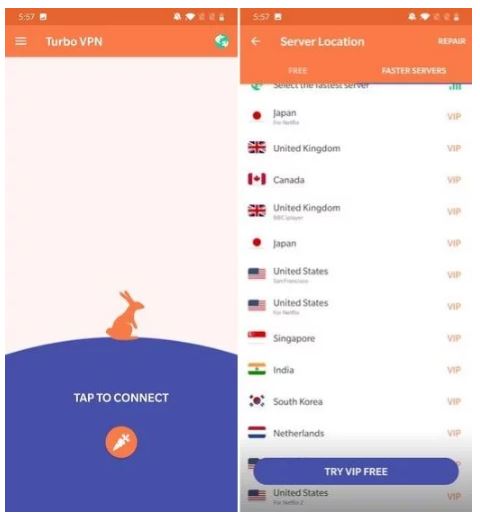
Sometimes due to heavy load, PUBG servers can’t keep up with multiple requests and that leads to higher ping rates. So, you can simply change the server in PUBG Mobile and see if the ping is dropping below 100. Besides that, you can also use a VPN which will connect you to a different server. I have tested the Turbo VPN and it’s among the best free VPNs out there with an excellent response time. So, install the VPN and change the location to your own country and try playing PUBG. You should have a lower ping this time.
6. Manage Space
If your smartphone storage is full and there are some space constraints, you should clean up your device for enabling smooth gameplay. There are many apps that create GBs of cache memory even if you don’t use those often. So, go to Settings and open Apps and then clean the cache memory of suspicious apps. It should hopefully result in better ping in PUBG Mobile.

7. Repair PUBG
If everything fails, you can always repair PUBG using the inbuilt settings. On the login screen, tap the “Repair” button and it will re-install PUBG from scratch. However, do note that it will reset all your gaming configurations and custom controls. Nevertheless, it should significantly reduce ping while playing PUBG.

8. Get a 5GHz WiFi Router
So, you have a great internet connection and did everything mentioned above, but still you can’t seem to reduce the ping below 100 ms then your router might be the culprit. Nowadays, our homes are filled with tons of smart devices that operate in the same 2.4GHz range. It makes the 2.4GHz frequency range extremely congested and if there are already other users hogging on your router then the latency becomes even worse. So, getting a 5GHz router will allow you to connect with the server much faster without any delay in response. The bottom line remains, go for the 5GHz router and enjoy PUBG lag-free with zero latency.
Reduce Ping in PUBG and Enjoy Smooth Gaming
So that was our short article on how to fix ping while playing PUBG online. We have included 8 various ways which can considerably reduce the ping below 100 so that you can have lag-free gaming. So go through the article stepwise and I am sure you would find a solution. Anyway, that is all from our side. If our article helped you fix the ping issue, then do comment down below and let us know.
Thanks,
Shivraj Kaithwas
Technology News
https://tech-news-l.blogspot.com


 Hello, my name is Shivraj Kaithwas. I'm a self-employed Desktop Support Engineer.